
Edit images
Upload a picture, describe the change, get the edited result — peer-to-peer and end-to-end encrypted. EXIF is stripped before upload; nothing is stored.
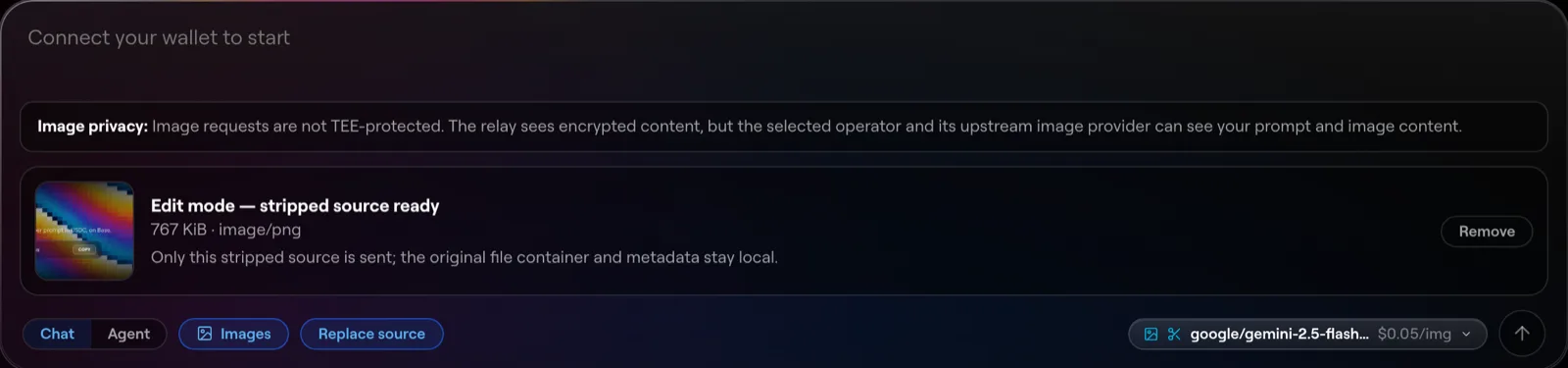
Image editing on Halo takes one picture plus a prompt and returns the edited result — remove an object, change a background, restyle the whole thing. Like everything on Halo it runs peer-to-peer and end-to-end encrypted: your photo goes only to the operator serving the request, the relay sees ciphertext, and nothing is stored along the way.
Halo is in alpha on Base mainnet with real USDC.
What you need
- A funded Halo balance — same as chat. New here? Start with use Halo on the web.
- One source image (JPEG, PNG, or WebP). Large photos are fine — a few MB is well within the limit — but this is a single-image flow: one picture in, edited pictures out.
Step by step
- Pick an edit-capable model. In the model picker, choose a model that lists image editing — generation and editing are separate capabilities, so not every image model can edit. The per-image price is shown up front.
- Attach your image. Upload the picture alongside your prompt. Before anything leaves your device, the app re-encodes the image locally and strips its metadata — GPS location, camera details, timestamps. The original file is never sent; if that scrubbing step fails for any reason, nothing is sent at all.
- Describe the change. Be concrete about what should change and what should stay: “replace the grey sky with a clear sunset, keep the building unchanged” beats “make it nicer”.
- Send. The stripped image and your prompt are encrypted together and routed to the operator. The edited result streams back encrypted and is decrypted in your browser.
- Download the result. As with generation, the edit exists only on your device — there’s no server-side copy to go back to, so save what you keep.
What it costs
The model’s flat per-image price in USDC — you pay for edited images actually delivered, not for uploading. A failed or aborted edit settles nothing. Uploading a bigger photo doesn’t cost more; pricing is per image out.
What the network sees
- Your photo, encrypted end to end. Only the serving operator can decrypt it, in memory, to run the edit. It is never written to disk and never persisted at any hop.
- No location, no device fingerprints. EXIF is stripped on your device before encryption, so even the operator never sees where or on what the photo was taken. The edited output is scrubbed the same way before it’s sent back.
- No IPs exchanged. The operator never learns your IP address, and you never learn theirs — the relay in the middle keeps both sides blind.
Edit from code or an agent
halo consume exposes a local OpenAI-compatible endpoint:
POST /v1/images/edits, multipart form-data with one image file plus
model, prompt, and optional n. Existing tools that speak the OpenAI
images API work unchanged. Details in
consume from a local endpoint.
Next steps
- Start from a blank canvas instead: generate images.
- How the privacy model works end to end: privacy & confidential compute.
- The full release story: image generation on Halo.